📄 In-Depth Platform Review 2025
Why FileToConvert is the Smartest File Conversion & Calculator Tool Online
A comprehensive look at the platform reshaping how millions of users convert files, calculate values, and stay secure online — all without spending a rupee.
200+File Formats Supported
100%Free to Use
0Files Stored After Conversion
24/7Availability
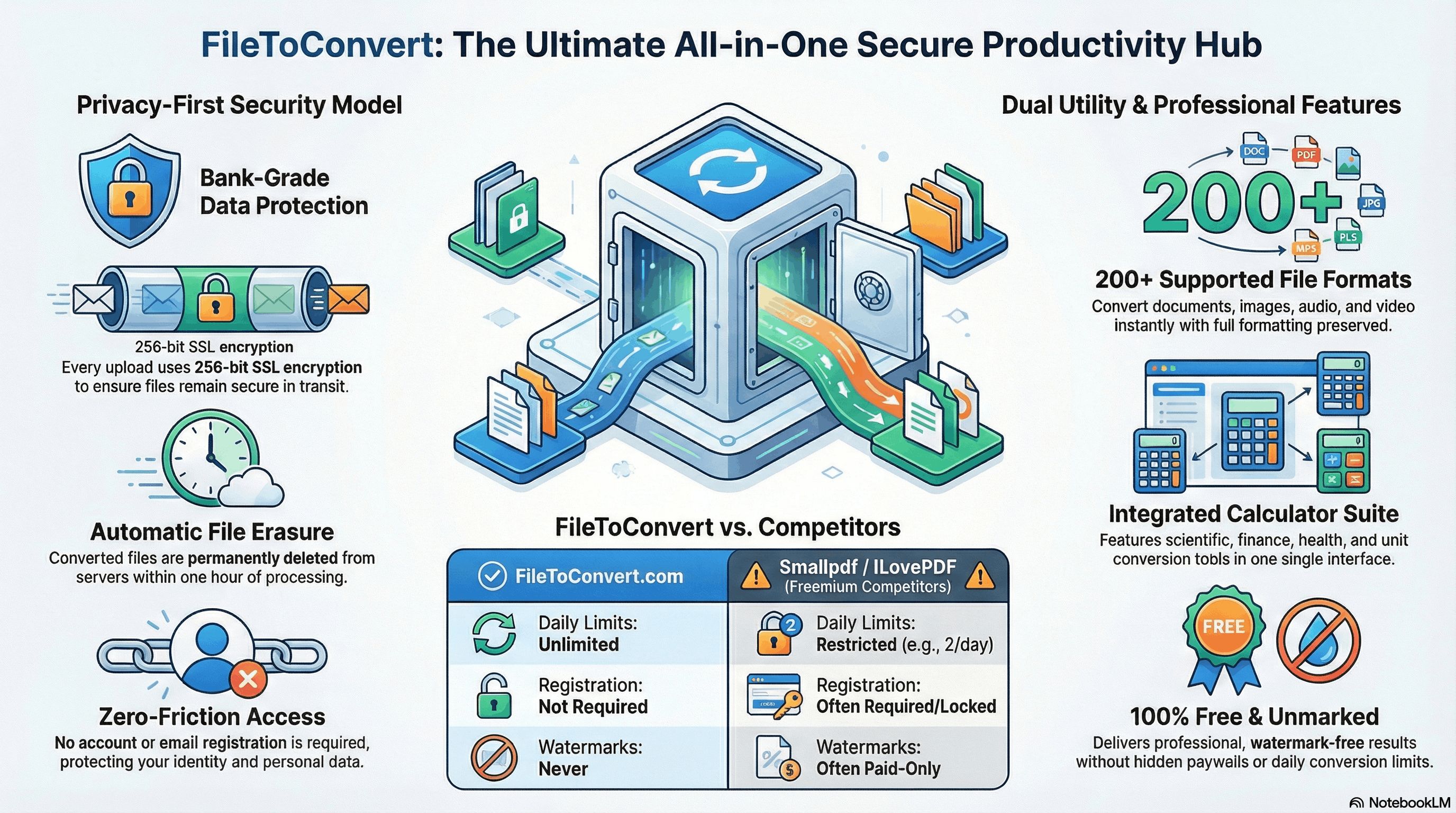
Bank-Grade Security You Can Actually Trust
Before talking about features and speed, let’s address what matters most: your files, your data, and your privacy. FileToConvert.com was engineered with security at its core — not as an afterthought.
End-to-End SSL Encryption
Every file you upload travels over 256-bit TLS/SSL encryption — the same standard used by global banks and payment gateways. Your files are never exposed in transit.
Auto-Delete Policy
Converted files are automatically and permanently deleted from servers within 1 hour of processing. No backups. No copies. No data hoarding. Your file lives briefly and vanishes.
Zero Data Selling
FileToConvert.com has a strict no-sell policy. Your uploaded content is never analyzed, shared with advertisers, or sold to any third party — period.
Secure Server Infrastructure
Processing happens on isolated, hardened servers. Files from different users are handled in completely separate environments, preventing any cross-contamination or unauthorized access.
No Account Required
You never have to create an account or share personal information. This means there is no user profile, no email tied to your files, and no identity to steal or compromise.
GDPR & Privacy Compliant
The platform respects international privacy regulations including GDPR. Users in Pakistan, India, the EU, and beyond are protected under transparent data handling practices.
Introduction
The Problem With Most File Conversion Platforms
If you’ve ever needed to convert a PDF to Word, convert image online, you know the frustration: slow websites plastered with ads, hidden paywalls after you’ve already uploaded your file, suspicious apps demanding installations, or sketchy platforms that seem to do more with your data than just convert it.
The online file conversion market is crowded — but most platforms exist to monetize you, not genuinely serve you. They lure users with “free” promises, then lock the output behind a subscription, watermark results, or harvest browsing data for advertising networks.
FileToConvert.com was built as a direct answer to this problem. It is a clean, fast, privacy-first platform that lets you convert files and calculate values online — without subscriptions, watermarks, installs, or data exploitation. Here’s a deep dive into why it genuinely stands apart.
What is FileToConvert.com? It is a free, browser-based platform offering file format conversion (documents, images, PDFs, spreadsheets) alongside a powerful suite of online calculators — all designed for speed, privacy, and ease of use.
Core Features
Everything You Can Do on FileToConvert.com
The platform is divided into two powerful pillars: File Conversion and Value Calculation. Together, they cover virtually every common productivity need a student, professional, or business user might have.
Document Conversion
Convert between PDF, DOCX, XLSX, PPTX, TXT, ODT, and more with full formatting preserved.
Image Conversion
Transform JPG, PNG, WEBP, SVG, GIF, BMP, TIFF and other formats instantly without quality loss.
Online Calculators
From scientific math and unit conversion to finance, health, and percentage calculators — all in one place.
Competitive Edge
Why FileToConvert.com Beats Every Other Platform
There’s no shortage of file conversion sites, but FileToConvert.com wins on almost every metric that matters to real users. Here is an honest breakdown of what makes it genuinely superior:
The platform combines conversion tools AND calculators under one roof — eliminating the need to juggle multiple tabs, apps, or websites for everyday productivity tasks.
- 1 Completely Free — No Hidden Paywalls
Many competitors like Smallpdf, ILovePDF, or Adobe Acrobat online start free but throttle features behind paywalls or limit conversions per day. FileToConvert.com offers full functionality at zero cost, with no conversion limits that punish regular users. - 2 No Registration or Account Creation
You don’t need an email address, a password, or a profile. Simply visit the site, upload your file, and convert. This removes friction entirely and protects your identity — a massive advantage over platforms that require sign-ups only to harvest emails for marketing. - 3 Zero Software Installation
Unlike desktop tools like VLC converters, Handbrake, or Adobe Creative Suite, FileToConvert.com runs 100% in your browser. No plugins, no extensions, no .exe files. It works equally well on Windows, Mac, Linux, Android, and iOS devices. - 4 Lightning-Fast Processing
Powered by optimized server-side processing, conversions happen in seconds — not minutes. Heavy cloud infrastructure means even large files process quickly without your CPU breaking a sweat. - 5 No Watermarks on Output
Several popular free tools stamp your converted files with watermarks unless you pay. FileToConvert.com delivers clean, professional output files every single time — completely unmarked. - 6 Dual Utility: Files + Calculators
No other mainstream file conversion platform offers a fully-integrated calculator suite. From loan EMI calculators to scientific math tools, FileToConvert.com removes the need to switch between tools or open multiple browser tabs. - 7 Clean, Ad-Minimal Interface
Competing platforms often bury tools under aggressive ad placements that slow down pages and confuse users. FileToConvert.com maintains a clean, distraction-free UI where the tool you need is always front and center.
Head-to-Head
FileToConvert.com vs. The Competition
Let’s put the facts side by side. How does FileToConvert.com compare against popular alternatives like Smallpdf, ILovePDF, Convertio, and Zamzar?
| Feature | FileToConvert.com | Smallpdf | ILovePDF | Convertio | Zamzar |
|---|---|---|---|---|---|
| 100% Free | ✔ Yes | ⚠ Limited | ⚠ Limited | ⚠ Freemium | ⚠ Limited |
| No Sign-Up Required | ✔ Yes | ✘ Required | ⚠ Optional | ✔ Yes | ⚠ For email |
| No Watermarks | ✔ Always | ✘ Paid only | ✔ Yes | ✔ Yes | ✔ Yes |
| Auto File Deletion | ✔ 1 hour | ✔ 1 hour | ✔ 2 hours | ✔ 24 hours | ⚠ 24 hours |
| Built-in Calculator Suite | ✔ Yes | ✘ No | ✘ No | ✘ No | ✘ No |
| No Software Install | ✔ Yes | ✔ Yes | ✔ Yes | ✔ Yes | ✔ Yes |
| Unlimited Daily Conversions | ✔ Yes | ✘ 2/day free | ⚠ Limited | ✘ 10/day free | ✘ 25MB limit |
| GDPR Compliance | ✔ Yes | ✔ Yes | ✔ Yes | ✔ Yes | ✔ Yes |
| Mobile Friendly | ✔ Fully | ✔ Yes | ✔ Yes | ✔ Yes | ⚠ Partial |
📊 Verdict: FileToConvert.com is the only platform in this comparison that offers unlimited free conversions, no registration, no watermarks, AND a built-in calculator suite — simultaneously. That’s a combination no competitor currently matches.
How It Works
Convert Any File in 3 Simple Steps
One of FileToConvert.com’s core strengths is its simplicity. You don’t need to be tech-savvy to use it. Here’s exactly how the conversion process works:
- 1 Upload Your FileClick the upload button or drag and drop your file directly onto the page. The platform accepts files from your device, and supported formats are clearly listed for every tool. No guessing involved.
- 2 Select Your Output FormatChoose the format you want to convert to from a clear dropdown menu. Dozens of options are available for every file type, making it easy to find exactly what you need.
- 3 Convert & DownloadHit the Convert button. Within seconds, your file is ready to download — clean, complete, and unaltered except for the format change. No email required, no waiting in queues.
Calculators
The Calculator Suite: A Hidden Gem
Most users discover FileToConvert.com for file conversion, then stay for the calculators. The platform hosts a comprehensive suite of online calculators that are equally useful for students, professionals, and everyday users:
Scientific Calculator
Trigonometry, logarithms, exponents, and complex equations — handled instantly in your browser.
Finance & EMI Calculator
Calculate loan EMIs, interest rates, mortgage payments, and compound interest with ease.
Unit Converter
Convert length, weight, temperature, speed, volume, area, and data units instantly.
Health Calculators
BMI, calorie needs, ideal weight, and other health metrics calculated accurately.
Percentage Calculator
Find percentages, percentage change, and percentage of totals — no mental math required.
Date & Age Calculator
Calculate exact age, days between dates, and countdown timers for events or deadlines.
No other major file conversion platform combines document/media tools with this breadth of calculators. It makes FileToConvert.com a genuine one-stop productivity hub rather than a single-use utility.
Use Cases
Who Benefits Most From FileToConvert.com?
The platform serves an incredibly wide range of users across professions and geographies. Here are the primary groups who find it indispensable:
- Students & Academics
Convert assignments from DOCX to PDF, resize images for presentations, and use math calculators for homework — all without spending money on software or subscriptions they can’t afford. - Freelancers & Remote Workers
Quickly convert client files, compress images for web delivery, and calculate invoice totals or project timelines using the built-in tools — streamlining workflow without switching apps. - Small Business Owners
Convert contracts, invoices, and reports between formats. Use finance calculators for quick business math. Do it all without paying for enterprise software licenses. - Everyday Mobile Users
The fully responsive design works flawlessly on smartphones. Convert files on the go from any device — whether you’re using an Android, iPhone, or tablet.
Final Verdict
The Verdict: FileToConvert.com is the Best All-in-One Choice
After evaluating the security model, feature set, pricing (free), ease of use, and competitive comparison, the conclusion is clear: FileToConvert.com is the most complete, trustworthy, and user-friendly file conversion platform available today.
It doesn’t just match competitors — it outperforms them in the areas that matter most: privacy, zero cost, no registration, no watermarks, and unique value-add features like the integrated calculator suite.
Whether you’re a student converting a thesis, a freelancer compressing a client image, or a professional calculating a loan EMI — FileToConvert.com has you covered, securely and for free.
Bottom Line: FileToConvert.com is the rare platform that keeps its promise. It’s free, it’s fast, it respects your privacy, and it genuinely works. There’s no better online file conversion and calculation platform available today.
Ready to Convert Your First File?
Join millions of users who trust FileToConvert.com for fast, secure, and completely free file conversions every day.🚀 Visit FileToConvert.com — It’s Free © 2026 Blog Review. This article is an independent editorial review of FileToConvert.com written for informational purposes.